
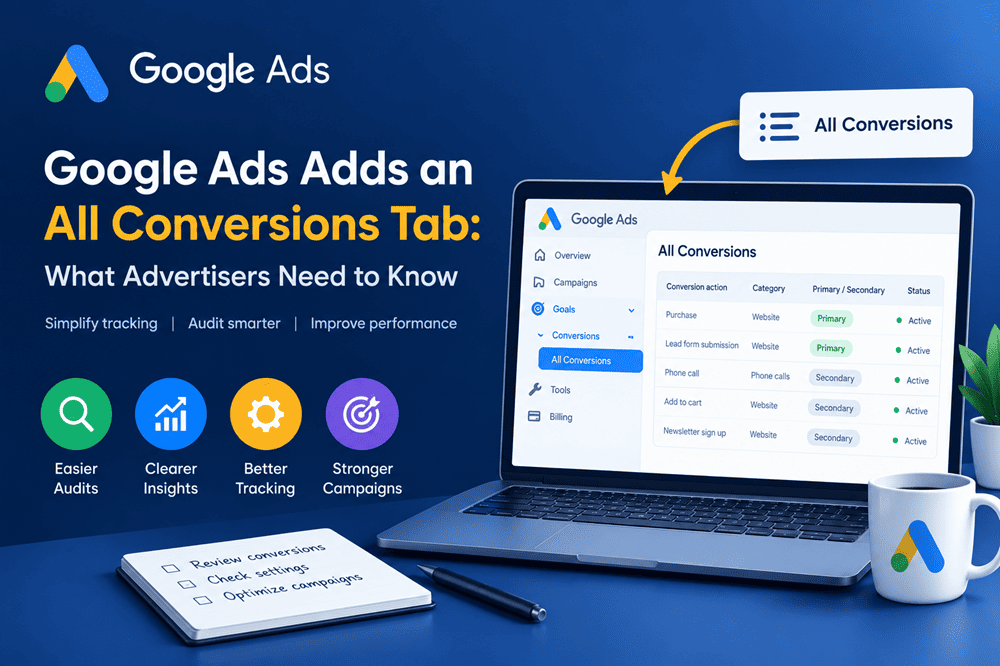
Google Ads account management is becoming easier to navigate with a new All Conversions tab designed to help advertisers review conversion actions, inspect tracking settings, and conduct account audits more efficiently.
Reported on October 28, 2026, the update introduces a dedicated submenu under Goals → Conversions → All Conversions. Instead of navigating through conversion categories and selecting an additional option to see the complete list, advertisers can access the detailed conversion action table directly. The rollout has been reported across multiple accounts, although availability may vary.
For businesses investing in paid search, this change highlights an important part of campaign management: understanding which actions Google Ads measures and whether that data accurately reflects business results.
What Is the New Google Ads All Conversions Tab?
The All Conversions tab is a dedicated view within Google Ads that brings conversion actions and their associated settings into a more accessible interface.
Previously, advertisers could visit the Conversions Summary page and select View all conversion actions to access the detailed table. The new submenu reduces that navigation step and makes conversion tracking information easier to review.
According to industry reporting, the expanded view can help advertisers inspect details such as account-level goal inclusion, click-through conversion windows, primary and secondary status, repeat rate, and when an action was last recorded. Available columns may vary by account and interface rollout.
The main benefit is convenience. Advertisers can review conversion configurations in one place instead of repeatedly opening separate conversion categories.
Why Does This Google Ads Update Matter?
Conversion data influences how advertisers evaluate campaigns, allocate budgets, and measure the value of their marketing investment.
If a business tracks form submissions but overlooks qualified phone calls, booked appointments, or completed purchases, its reports may not reflect the complete customer journey. Similarly, incorrectly configured conversion actions can lead marketers to draw misleading conclusions about campaign performance.
The new All Conversions tab can make it easier to investigate these issues by bringing important information into a single view.
Here are four practical benefits.
1. Faster conversion tracking audits
Regular Google Ads audits help identify outdated conversion actions, incorrect settings, and measurement gaps.
With the detailed table more readily accessible, advertisers can review their conversion setup without navigating through multiple categories. This is especially useful for agencies managing several accounts or businesses running campaigns across different services.
2. Better visibility into primary and secondary conversions
Not every tracked action should influence automated bidding in the same way.
For example, an online store may prioritize completed purchases, while also measuring product views, newsletter sign-ups, and add-to-cart events. A service business may prioritize qualified lead submissions while observing brochure downloads or other engagement actions.
Reviewing the status of these actions helps advertisers understand which metrics are used for bidding and which are primarily used for reporting.
3. Easier identification of potential tracking problems
An action that has stopped recording conversions, has an unsuitable conversion window, or is configured differently from the intended business goal deserves investigation.
The All Conversions view can help surface these concerns during routine reviews. However, the interface itself does not automatically guarantee correct tracking; advertisers still need to validate tags, events, and settings.
4. More efficient campaign reporting
A consolidated view can reduce the time spent gathering information before making optimization decisions.
Advertisers can use the information to decide which conversion actions need further testing, whether their goals are configured appropriately, and whether reported results align with actual business outcomes.
How to Find the All Conversions Tab in Google Ads
If the feature is available in your account, follow these steps:
- Sign in to your Google Ads account.
- Open Goals from the navigation menu.
- Select Conversions.
- Click All Conversions to open the detailed conversion action view.
- Review the available settings and performance information.
- Enable the Action optimization column if you need to inspect whether actions are classified as primary or secondary.
The exact interface and column availability may differ between accounts as the rollout progresses.
If you cannot see the new submenu, check the existing Conversions Summary and use the available option to view all conversion actions. You can also consult the official Google Ads Help documentation on All Conversions.
Primary vs. Secondary Conversions: What Is the Difference?
Understanding the difference between primary and secondary conversion actions is essential when auditing a Google Ads account.
Primary conversion actions are generally reported in the main Conversions column and can be used for bidding when they are included in the applicable standard goal used by the campaign.
Secondary conversion actions are generally used for observation and reporting in the All Conversions column rather than for standard goal-based bidding. There is an important exception: a secondary action included in a custom goal can be used for bidding.
For this reason, advertisers should review the actual goal configuration rather than relying on the primary or secondary label alone.
Consider this example:
| Conversion action | Typical purpose |
|---|---|
| Completed purchase | Main sales objective |
| Qualified lead form | Main lead-generation objective |
| Add to cart | Supporting shopping metric |
| Newsletter sign-up | Audience-building metric |
| Brochure download | Supporting engagement metric |
These are illustrative examples, not universal recommendations. The correct configuration depends on what the business wants its campaigns to achieve.
A lead-generation company should generally prioritize meaningful leads over low-value interactions. An ecommerce company should make sure purchase tracking is accurate and that supporting events do not unintentionally replace its primary sales objective.
How to Use the All Conversions Tab for a Google Ads Audit
The new view is most useful when it becomes part of a structured account review rather than an occasional check.
Step 1: Identify your actual business goals
Start by defining what success means for your organization. It could be completed purchases, qualified enquiries, phone calls, booked consultations, or another measurable action.
Avoid treating every website interaction as equally valuable.
Step 2: Review each conversion action
Check the action name, its purpose, and its relationship to your business goals. Look for duplicate actions, outdated events, or actions that no longer represent meaningful customer activity.
Do not remove a conversion action simply because it has low volume. Confirm whether it is still required before making changes.
Step 3: Check primary and secondary settings
Review whether each action is configured appropriately for reporting and bidding. Pay particular attention to account-level goals, campaign-specific goals, and custom goals where applicable.
An incorrect configuration can affect how campaign results are interpreted and how automated bidding uses conversion signals.
Step 4: Validate tracking implementation
Use the relevant Google Ads diagnostics and testing tools to check whether conversion tags and events are firing as intended.
For website conversions, verify that the correct event is recorded after the intended action. Check for duplicate firing, missing events, and inconsistencies between the website, tag setup, and advertising reports.
Where appropriate, compare Google Ads results with your analytics platform, CRM, ecommerce platform, or sales records. Differences can occur because of attribution, reporting windows, consent, and measurement methodology, so investigate before assuming that one system is wrong.
Step 5: Review conversion windows and attribution
Conversion windows determine how long after an eligible interaction a conversion can be attributed, while attribution settings affect how credit is assigned across eligible interactions.
Check whether these settings make sense for your sales cycle. A business with a longer consideration period may need a different approach from one selling low-cost products with immediate purchases.
Step 6: Compare tracked conversions with business outcomes
A campaign may generate many form submissions but relatively few qualified prospects. Another may produce fewer leads but more paying customers.
Review lead quality, sales outcomes, cost per qualified lead, revenue, and conversion value wherever reliable data is available. These measures help connect advertising reports to real business performance.
Step 7: Document changes and test their impact
Record important configuration changes, the reason for each change, and the date it was implemented.
Avoid changing several major settings simultaneously without a clear testing plan. A documented process makes it easier to diagnose unexpected changes in reported performance.
Common Google Ads Conversion Tracking Mistakes to Avoid
Even with a more accessible interface, several measurement problems require attention.
Double-counting conversions: The same action may be recorded through multiple implementations, such as overlapping tags or integrations. Check for duplicate measurement before relying on the totals.
Tracking low-value actions as primary goals: If automated bidding optimizes toward actions that rarely lead to business outcomes, campaign performance may become less aligned with revenue or qualified leads.
Ignoring phone calls: For businesses that depend on calls, missing or incorrectly configured call tracking can leave an important part of the customer journey unmeasured.
Forgetting offline conversions: Some businesses close sales after the original ad interaction. Where supported and appropriately implemented, importing qualified lead or sales outcomes can provide additional context about campaign value.
Making changes without validation: A configuration change is not proof that tracking works. Test the intended user journey and confirm that the expected event is recorded.
Comparing different metrics as if they were identical: The Conversions and All Conversions columns can include different sets of actions. Understand what each metric includes before comparing totals or calculating performance changes.
Does the All Conversions Tab Automatically Improve Campaign Performance?
No. The update primarily improves access to conversion action information. It does not automatically fix tracking errors, increase conversion rates, lower advertising costs, or make campaigns profitable.
Its value comes from helping advertisers find and review information more efficiently. Better decisions still depend on correct implementation, suitable conversion goals, meaningful business data, and ongoing campaign analysis.
For example, a business that discovers duplicate lead tracking can investigate and correct the underlying setup. A business that finds an unsuitable primary conversion action can evaluate whether its bidding strategy is optimized toward the right objective.
The potential improvement comes from the quality of the audit and the actions taken afterward—not from the interface change alone.
What This Update Means for Businesses and Digital Marketing Agencies
For businesses running Google Ads, the new submenu offers a useful opportunity to review whether campaign measurement matches actual commercial objectives.
For digital marketing agencies, it may simplify recurring account audits, onboarding reviews, and conversion tracking diagnostics. Teams can use a consistent checklist to review conversion actions before evaluating campaign results.
A practical monthly review could include:
- Checking whether important conversion actions are recording data.
- Reviewing primary and secondary action settings.
- Investigating duplicate or inactive conversion actions.
- Validating conversion windows and goal configurations.
- Comparing lead or purchase data with business records.
- Documenting changes and monitoring their impact.
For businesses working with an agency, ask not only how many conversions the campaigns generate, but also what those conversions represent and how their accuracy is verified.
At ClicksYou, a data-focused approach to digital marketing means connecting advertising activity with meaningful business outcomes. Accurate measurement provides a stronger foundation for evaluating campaigns and making informed optimization decisions.
Learn more about ClicksYou and its digital marketing services.
How to Prepare for the New All Conversions View
Advertisers do not need to redesign their entire account simply because a new submenu appears. Instead, use the update as an opportunity to review existing measurement practices.
Start with your most important campaigns and conversion actions. Confirm that purchase, lead, or call tracking is working as expected. Review how primary and secondary actions are configured, then prioritize any issues that could distort reporting or bidding.
If the new view has not appeared in your account, continue using the existing conversion reporting options and check the official Google Ads documentation for current guidance.
The objective is straightforward: make sure the numbers used to evaluate advertising performance reflect actions that matter to the business.
Frequently Asked Questions
1. What is the Google Ads All Conversions tab?
It is a dedicated view under Goals → Conversions that provides access to the full conversion action table and relevant settings. It makes conversion tracking reviews easier to navigate.
2. How do I access the All Conversions tab?
Open Google Ads, navigate to Goals, select Conversions, and choose All Conversions if the submenu is available in your account. Otherwise, use the existing option to view all conversion actions.
3. What is the difference between Conversions and All Conversions?
The Conversions column generally includes eligible primary conversion actions used for standard goal-based bidding. All Conversions includes those conversions plus additional tracked actions and certain other conversion sources. The exact totals depend on your configuration.
4. Does the All Conversions tab fix tracking errors?
No. It provides a more convenient view for reviewing conversion actions and their settings. Advertisers must still test tags, validate events, investigate duplicate tracking, and resolve configuration problems.
5. Should secondary conversions be included in bidding?
Not automatically. Secondary actions are generally intended for observation, but a secondary action included in a custom goal can be used for bidding. Select settings based on the campaign’s objectives and the value of each action.
6. Is the new Google Ads feature available to every advertiser?
Industry reporting indicates that the submenu has appeared in multiple accounts, but availability may vary during rollout. If you cannot access it, use the existing conversion action view.
7. Why is conversion tracking important for Google Ads optimization?
Reliable tracking helps advertisers understand which campaigns generate meaningful actions, evaluate costs, and provide appropriate conversion signals for automated bidding. Inaccurate data can lead to misleading performance assessments.
8. How often should businesses audit Google Ads conversion tracking?
Review tracking regularly and whenever you make significant changes to your website, tags, forms, checkout, CRM integrations, or campaign goals. A monthly audit is a useful starting point, but higher-spend or frequently changing accounts may require more frequent checks.
Final Thoughts
Google Ads’ new All Conversions tab is a practical interface improvement for advertisers who need to review conversion actions and audit account settings. By making the detailed view easier to reach, it can reduce navigation and help teams investigate measurement issues more efficiently.
However, better reporting starts with more than a convenient interface. Businesses still need clearly defined goals, correctly implemented tracking, appropriate conversion settings, and a way to connect advertising data with actual sales or lead quality.
Use this update as an opportunity to strengthen your measurement process. When conversion data is trustworthy, campaign analysis becomes more meaningful—and marketing decisions can be based on evidence rather than assumptions.
News reference: Search Engine Land: Google Ads adds ‘All Conversions’ tab to simplify conversion tracking and audits