
Finding the right keywords is one of the most important steps in an effective SEO strategy. However, keyword research does not always need to start with a blank spreadsheet or a keyword research tool. Sometimes, a website already contains valuable keyword information that can help you understand its content, identify search topics and discover optimization opportunities.
Whether you want to review your own website, analyse a competitor’s pages or understand how a particular business targets search queries, knowing how to search a website for keywords can save time and make your research more focused.
For example, imagine you run a digital marketing agency and want to understand which keywords a competitor uses on its website. You can search specific phrases using Google, inspect page content through your browser, review search performance data or use SEO analysis platforms.
Each method provides a different type of information. Some help you find exact words on a page, while others reveal the broader keyword themes behind a website’s organic visibility.
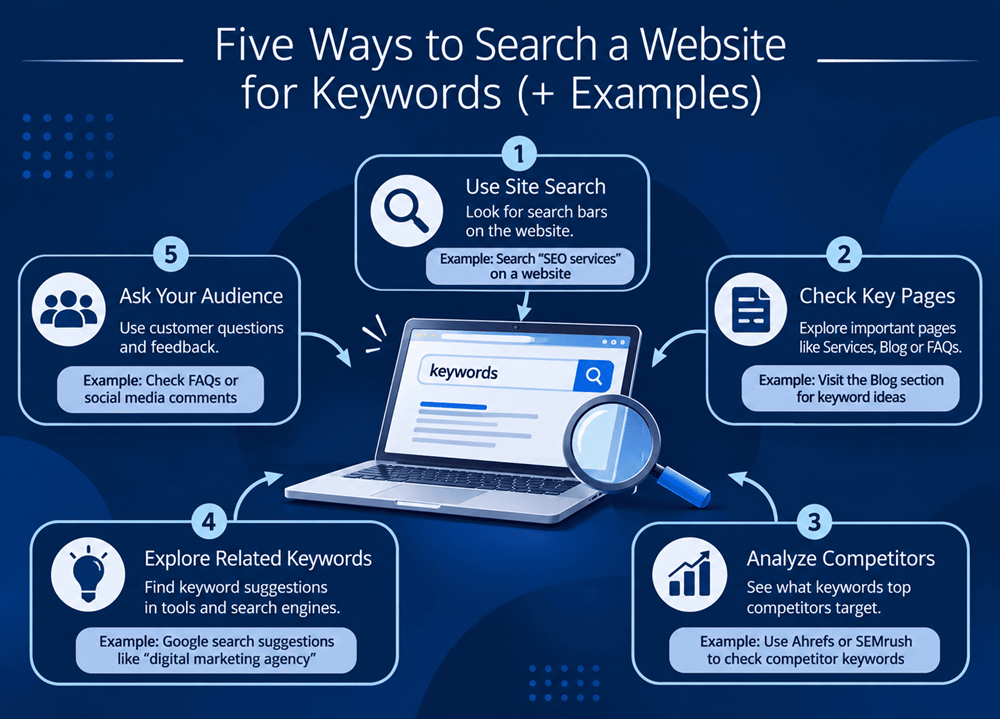
In this guide, we explain five practical ways to search a website for keywords, provide examples for each method and show how to use the findings to improve your SEO strategy.
Why Should You Search a Website for Keywords?
Searching a website for keywords helps you understand how its content is organised and which search terms are relevant to its pages.
It is useful for several SEO activities:
- Competitor research: Identify topics and keyword themes covered by competing websites.
- Content audits: Find pages that target similar or overlapping keywords.
- On-page optimization: Check whether important terms appear in titles, headings and body content.
- Content planning: Discover topics that deserve new articles, guides or landing pages.
- Internal linking: Identify relevant pages that can be connected through contextual links.
- Keyword gap analysis: Find relevant topics your website does not cover yet.
One important distinction: finding a keyword on a webpage does not prove that the page ranks for it. To understand actual search visibility, you need search performance data from tools such as Google Search Console or third-party SEO platforms.
1. Use Google Search Operators to Find Keywords on a Website
Google search operators are among the simplest ways to investigate website content. They let you narrow a search to a particular domain, URL or phrase.
Instead of searching the entire internet, you can ask Google to show pages from one specific website that contain a particular term.
Useful Google Search Operators
A. Search an entire website for a keyword
Use the site: operator followed by the domain and keyword.
Example:
site:clicksyou.com SEO services
This asks Google to show indexed pages from ClicksYou that are relevant to the phrase “SEO services”.
B. Find an exact phrase on a website
Use quotation marks around the phrase.
Example:
site:clicksyou.com "website development"
This narrows the search to pages associated with that exact phrase.
C. Search for a keyword in a page title
Use the intitle: operator.
Example:
site:clicksyou.com intitle:SEO
This looks for indexed pages from the domain with “SEO” in their titles.
D. Search for a keyword within page text
Use the intext: operator.
Example:
site:clicksyou.com intext:"local SEO"
This helps locate pages where the phrase appears in the indexed page text.
When Should You Use Google Search Operators?
They are particularly useful when you want to:
- Check whether a website has content about a specific topic.
- Find existing pages that mention a target keyword.
- Explore how competitors organise content around a service.
- Locate potential content opportunities within a large website.
Example: Suppose you are researching a competitor’s website development services. You could search:
site:competitor.com "web development"
You can then review relevant indexed pages and understand the topics the competitor has covered.
Important: Google search operators are discovery shortcuts, not complete website crawlers. Search results may be incomplete, and an indexed page may not show every occurrence of a phrase.
2. Use the Browser’s Find Feature to Search a Webpage
If you want to find a specific keyword on an individual webpage, your browser’s built-in Find feature is one of the quickest methods.
You do not need to install an extension or use an external SEO tool.
How to Search for Keywords Using Ctrl + F
Follow these steps:
- Open the webpage you want to analyse.
- Press
Ctrl + Fon Windows orCommand + Fon Mac. - Enter the keyword or phrase you want to find.
- Review the highlighted matches on the page.
- Use the next and previous controls to move between occurrences.
Example
Suppose you are analysing a webpage about digital marketing services and want to check whether it mentions:
- SEO services
- Website development
- Social media marketing
- Google Ads
Search for each phrase separately using the browser’s Find feature.
You can quickly identify whether these terms appear in the visible webpage content.
What Can You Learn From This Method?
Browser search can help you:
- Check keyword placement in existing content.
- Find repeated phrases.
- Locate relevant sections for internal linking.
- Review whether important service terms appear naturally.
- Identify content that may need further editing.
However, Ctrl + F only searches the content available to the browser. It does not provide search volume, keyword difficulty, rankings or reliable keyword-density analysis.
3. Use SEO Tools to Discover a Website’s Ranking Keywords
If your objective is to understand which keywords bring organic visibility to a website, dedicated SEO tools are more suitable than manual searches.
Platforms such as Ahrefs, Semrush and Similarweb offer different types of website and competitor analysis. Their available features and data coverage vary.
Popular SEO Tools for Website Keyword Research
Ahrefs
<escape>Ahrefs’ Site Explorer</escape> can help you investigate a domain’s estimated organic keywords, ranking pages and backlink profile.
Example workflow:
- Open Ahrefs.
- Enter a competitor’s website domain.
- Navigate to the Organic Keywords report.
- Review the keywords associated with ranking pages.
- Filter by country, position or other available metrics.
Semrush
<escape>Semrush’s Organic Research</escape> provides domain-level organic keyword information, including estimated traffic and ranking positions.
Example workflow:
- Enter the website domain.
- Open the Organic Research report.
- Review the organic keyword list.
- Identify keywords relevant to your services.
- Compare competitor keywords with your own website’s coverage.
Similarweb
Similarweb can help explore estimated traffic sources, audience information and search-related website performance, depending on the available plan and data coverage.
Example: Competitor Keyword Research
Imagine your agency provides SEO and website development services.
You want to analyse a competing agency’s website to understand which topics it covers.
You could use an SEO tool to identify keyword themes such as:
| Keyword | Possible search intent | Relevant page |
|---|---|---|
| SEO agency in Noida | Commercial | SEO service page |
| Website development company | Commercial | Website development page |
| Local SEO services | Commercial | Local SEO page |
| SEO keyword research | Informational | Blog or guide |
| Technical SEO audit | Informational / commercial | Service or resource page |
These are illustrative examples, not verified competitor rankings or search-volume figures.
Why Are SEO Tools Useful?
Unlike a basic word search, SEO tools can help you understand the relationship between keywords, ranking pages and estimated organic traffic.
Use the findings to identify:
- Competitor keyword opportunities.
- Pages with strong organic visibility.
- Keywords that may be relevant to your business.
- Topics that deserve dedicated content.
- Potential keyword gaps in your website strategy.
Remember that third-party ranking and traffic figures are estimates. Verify your own website’s performance through Google Search Console whenever possible.
4. Use Google Search Console to Find Keywords Already Bringing Traffic
Google Search Console is particularly valuable because it provides search performance information for a website you own or are authorised to access.
It helps you understand the queries for which your pages appeared in Google Search.
This is different from searching for words within a competitor’s website. Search Console gives you first-party performance data for your verified property.
How to Find Website Keywords in Google Search Console
Follow these steps:
- Open Google Search Console.
- Select the correct website property.
- Navigate to Performance → Search results.
- Enable the metrics you want to review, such as clicks, impressions, CTR and average position.
- Open the Queries tab.
- Review the search terms associated with your website.
- Use the Pages tab to see which URLs received search visibility.
Example
Imagine your website offers website development services.
Search Console might show queries such as:
- Website development company
- Website designing services
- Web development agency near me
- WordPress website development
These are examples of possible queries, not actual ClicksYou Search Console results.
You can review their impressions, clicks and average positions to understand where your website already has search visibility.
Find Keyword Opportunities From Existing Data
Pay attention to these situations:
High impressions but low clicks: The page is appearing in search results, but its title or description may not be compelling or relevant enough.
Relevant queries with lower average positions: The page may need stronger content, clearer search intent alignment or improved internal linking.
Unexpected search queries: These may reveal topics your audience cares about that your current content does not address directly.
Multiple pages appearing for similar queries: Review whether the pages have distinct purposes or whether they overlap unnecessarily.
Why Search Console Matters
It helps you make SEO decisions using actual website search performance instead of relying entirely on third-party estimates.
It does not reveal every search query, and some data may be anonymised or unavailable. Still, it is one of the most useful starting points for improving an existing website.
5. Inspect Website Content, Headings and Metadata Manually
A webpage contains more keyword information than the visible paragraphs alone.
Search engines use multiple elements to understand a page’s subject and structure. Reviewing these elements can help you understand how a website communicates its main topic.
Important Website Elements to Check
A. Page title
The title element helps describe the subject of a webpage and can influence how the page is represented in search results.
In Chrome, right-click the page, choose View Page Source and look for the <title> element.
Example:
<title>SEO Services in Noida | ClicksYou</title>
B. Meta description
The meta description summarises the page and may be used as the search-result snippet.
Example:
<meta name="description" content="Explore professional SEO services in Noida to improve website visibility and attract relevant customers.">
C. H1 and H2 headings
Headings organise the page and explain its main sections.
Example:
- H1: SEO Services in Noida
- H2: Our SEO Process
- H2: Local SEO Solutions
- H2: Technical SEO Services
D. Image alt text
Image alternative text describes an image for users who cannot see it and helps search engines understand its context.
Example:
alt="Digital marketing team reviewing an SEO performance report"
Alt text should describe the image accurately rather than repeat a target keyword unnecessarily.
E. URL structure
A descriptive URL can communicate the page topic.
Example:
clicksyou.com/service/local-seo/
How to Inspect These Elements
You can use browser developer tools or the page source:
- Open the webpage.
- Right-click and select View Page Source.
- Search for
<title>,description,<h1>,<h2>andalt=. - Review whether the content accurately describes the page.
- Compare the page elements with the intended search topic.
For larger websites, crawling tools can make this process faster by collecting titles, headings, metadata and URLs across multiple pages.
Why This Method Is Important
A website can mention a keyword in its paragraphs but still have unclear page structure.
Reviewing titles, headings, metadata and image descriptions helps you understand whether the page communicates a consistent subject to both visitors and search engines.
How to Choose the Right Method for Your SEO Goal
Each method answers a slightly different question. Choose according to what you are trying to discover.
| Your objective | Recommended method |
|---|---|
| Find a phrase across indexed website pages | Google search operators |
| Find a word on one open webpage | Browser Ctrl + F |
| Discover estimated competitor ranking keywords | Ahrefs or Semrush |
| Find queries bringing traffic to your own website | Google Search Console |
| Review titles, headings and metadata | Manual page inspection |
For a complete website keyword analysis, combine multiple methods instead of depending on one source.
How to Turn Website Keyword Research into an SEO Strategy
Finding keywords is only the research stage. The next step is deciding what to do with the information.
Here is a practical workflow.
Step 1: Create a Keyword List
Collect relevant terms from website pages, competitor research, search queries and customer questions.
Remove unrelated terms and group similar phrases into topics.
Step 2: Understand Search Intent
Determine whether a user wants information, wants to compare providers or is ready to purchase.
For example:
- “What is local SEO?” is informational.
- “Best SEO agency in Noida” is commercial.
- “Hire an SEO company” is transactional.
The content should match the purpose behind the search.
Step 3: Map Keywords to Relevant Pages
Avoid assigning every keyword to the homepage.
Instead:
- Assign service keywords to service pages.
- Assign informational keywords to blog posts.
- Assign location keywords to genuinely useful local landing pages.
- Assign product-related keywords to relevant product pages.
This creates a more organised website structure.
Step 4: Identify Content Gaps
Compare your existing pages with the topics customers are searching for.
If a competitor covers a relevant topic that your website does not, investigate whether it deserves a new page or an update to an existing one.
Do not copy competitor content. Use the research to identify unanswered questions and create original material.
Step 5: Monitor Results
After updating pages or publishing new content, review performance in Google Search Console and your analytics platform.
Track clicks, impressions, relevant search queries, engagement and conversions.
Keyword research should be an ongoing process because search behaviour, competition and business priorities change.
How Website Keyword Research Supports GEO and AEO
Keyword research is no longer only about identifying phrases for traditional search rankings. It can also help businesses understand the questions people ask and the information they need.
Answer Engine Optimization (AEO) focuses on making content clear and useful for direct answers.
To support AEO:
- Include direct answers to common questions.
- Use descriptive question-based headings where appropriate.
- Explain technical concepts in accessible language.
- Organise information with clear sections and lists.
- Keep facts accurate and up to date.
Generative Engine Optimization (GEO) focuses on making content and brand information easier for generative AI systems to understand and potentially discover.
To support GEO:
- Publish original and useful explanations.
- Include specific examples and practical details.
- Clearly identify the business, its services and expertise.
- Maintain accurate information across relevant online platforms.
- Use structured data where it accurately describes the page.
- Support important claims with credible sources.
These practices can improve content clarity and accessibility, but no keyword technique, schema implementation or content format guarantees inclusion in AI-generated answers.
Common Mistakes to Avoid When Searching a Website for Keywords
Keyword research can become misleading when the findings are interpreted incorrectly.
Avoid these mistakes:
- Assuming keyword presence means ranking: A word appearing on a page does not prove that the page ranks for it.
- Repeating keywords excessively: Keyword stuffing makes content unnatural and can harm the user experience.
- Ignoring search intent: A page may contain the right phrase but still fail to satisfy what the searcher wants.
- Treating estimated data as exact: Third-party traffic and ranking figures are estimates, not verified analytics.
- Copying competitor content: Competitor analysis should inspire better research, not duplicate another website’s work.
- Ignoring existing pages: Before creating a new article, check whether an existing page already covers the topic.
- Targeting every keyword on one page: Different search intents often need different content.
- Forgetting conversions: Rankings and traffic are useful indicators, but business enquiries and sales matter too.
Frequently Asked Questions
1. How can I search for keywords on a website?
You can use Google’s site: search operator, your browser’s Ctrl + F feature, SEO tools, Google Search Console for your own website, or manual inspection of page titles and headings.
2. How do I find all keywords used on a website?
There is no single simple method that guarantees a complete list of every keyword on a website. You can crawl its pages, inspect content and metadata, and use SEO platforms to discover estimated ranking keywords. Search Console can show queries for your verified website.
3. How do I find competitor keywords?
Enter a competitor’s domain into a platform such as Ahrefs or Semrush and review its organic keyword reports. Then examine the ranking pages and identify topics relevant to your own audience.
4. Can I find website keywords using Google?
Yes. Google’s site: operator can help locate indexed pages related to a particular keyword. For example, site:example.com "SEO services" searches indexed pages from that domain for the phrase.
5. Is Google Search Console useful for keyword research?
Yes. Its Performance report shows search queries associated with your website’s impressions and clicks. It is particularly useful for finding existing keyword opportunities and monitoring organic search performance.
6. What is the difference between finding keywords and checking keyword rankings?
Finding keywords means identifying terms that appear in website content or are relevant to a page. Checking rankings means determining where a webpage appears in search results for a particular query.
7. Which tools are best for website keyword research?
Google Search Console is useful for first-party performance data. Ahrefs and Semrush offer competitor keyword analysis and estimated organic visibility. Google search operators and browser tools are useful for quick manual checks.
7. Which tools are best for website keyword research?
Google Search Console is useful for first-party performance data. Ahrefs and Semrush offer competitor keyword analysis and estimated organic visibility. Google search operators and browser tools are useful for quick manual checks.
8. How often should I check my website keywords?
Review keyword performance regularly, such as monthly, and whenever you make significant website or content changes. The appropriate frequency depends on the website’s publishing activity and competitive environment.
Conclusion
Searching a website for keywords is a practical way to understand its content, identify optimization opportunities and plan more focused SEO campaigns.
Google search operators help locate indexed pages, browser search finds terms within individual webpages, SEO platforms reveal estimated competitor keyword visibility, Google Search Console provides first-party search performance data, and manual inspection helps evaluate titles, headings and metadata.
The most effective approach is to combine these methods, understand search intent and map relevant keywords to useful pages. Rather than focusing on how many times a phrase appears, focus on whether each page answers a real customer question and supports a meaningful business goal.
At ClicksYou, we believe successful SEO starts with research that connects search behaviour with useful content, a well-structured website and measurable business outcomes. A smarter keyword strategy can help businesses build stronger organic visibility and create better opportunities to reach their target audience.